FaceTime Like a Pro
Get our exclusive Ultimate FaceTime Guide 📚 — absolutely FREE when you sign up for our newsletter below.

FaceTime Like a Pro
Get our exclusive Ultimate FaceTime Guide 📚 — absolutely FREE when you sign up for our newsletter below.


No Apple Watch is fully waterproof. Here’s what each model can handle, from rain-only Series 1 to scuba-ready Ultra 4, plus the soap, sauna and band mistakes to avoid.

 ByMehak Siddiqui and Ravi Teja KNTS
As your go-to fitness buddy, it makes perfect sense to want to use your Apple Watch for tracking workouts, swimming, or any water-related activities. This handy device is designed to help you track your progress, set fitness goals, and stay motivated during your exercise sessions.
But before you dive into the pool or head out for a run in the rain, you might be asking yourself: can your Apple Watch really handle water? The short answer: every Apple Watch is water resistant, not waterproof, with ratings that range from IPX7 on the original models to 100 meters on Ultra. Knowing the water resistance features of your Apple Watch is crucial to ensure you use it safely and make the most of its capabilities during all your activities.
It’s crucial to understand that while Apple Watches are water resistant, they aren’t completely waterproof.
Apple Watches are built to resist water up to certain limits, but if you push those limits, they can still get damaged.
Here’s a straightforward table that outlines the water resistance levels for each Apple Watch model:
| Apple Watch Model | Water Resistance Level | Standards/Certifications | Suitable For |
|---|---|---|---|
| Series 1 & 1st Generation | Splash resistant (IPX7) | IEC 60529 | Hand washing, rain. Submerging isn’t recommended |
| Series 2 and later (including SE models), including Series 11 and Series 12 | Up to 50 meters (WR50) | ISO 22810:2010 | Shallow-water swimming, such as in a pool or the ocean |
| Ultra and later, including Ultra 3 and Ultra 4 | Up to 100 meters (WR100) | ISO 22810:2010, EN13319 | Swimming, snorkeling, high-speed water sports, and recreational scuba diving up to 40m (130ft) |
Note: Water resistance isn’t a permanent feature and can wear down over time with regular use. Apple also says a watch can’t be rechecked or resealed for water resistance.
Your Apple Watch is great for tackling many daily tasks, but it’s essential to remember that not all water activities are safe for it. Here’s a quick overview:
Not all Apple Watch bands are created equal in terms of water resistance. Apple says several bands aren’t water resistant, and that stainless steel and leather bands shouldn’t be exposed to liquids.
Leather and metal bands are the ones to watch. They can absorb water, tarnish, or wear down if they get wet, which affects both their look and comfort.
Bands Apple lists as not water resistant:
A band that isn’t water resistant can take a hit when it gets wet. It might get damaged, feel uncomfortable, or even irritate your skin. So, if you’re planning to swim or know your watch will get splashed, it’s best to go for a sport band. Choosing the right band helps keep your Apple Watch in great shape and comfy to wear, no matter what you’re up to. If you’re shopping for one, our guide to the best Apple Watch bands can help.
Apple doesn’t publish a time limit for how long the watch can stay submerged. As a precaution, keep continuous exposure to about 30 minutes, especially if you’re swimming or doing water sports. That matters more as the watch gets older, since water resistance can diminish over time.
After swimming, including in salt or chlorinated water, gently rinse Series 2 and later under lightly running, warm, fresh water. Then dry the watch thoroughly.
Apple Watch Series 2 and later come with a handy Water Lock feature. It turns on automatically when you start a water-based workout, such as swimming or surfing, and on Ultra it also turns on when a scuba dive starts. Ultra and later can also turn it on automatically once the watch is submerged to 10 cm or deeper. While it’s on, the screen ignores touch, so water droplets won’t trigger taps. Double tap and wrist flick gestures stop working too.
How to activate Water Lock manually:
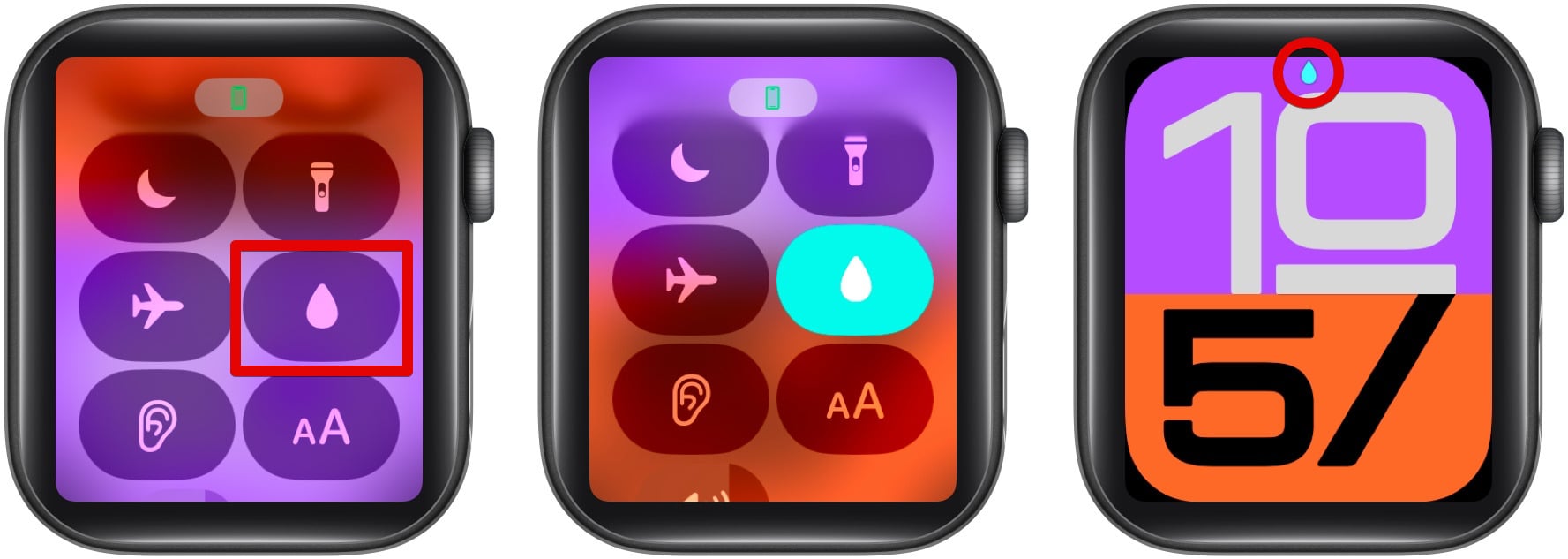
When you finish, press and hold the Digital Crown until the display says Unlocked. A series of tones clears the water from the speaker. On watchOS 8 or earlier, turn the Digital Crown instead of pressing it.
To keep your Apple Watch as water resistant as possible:
Myth: Apple Watches are waterproof.
Fact: No Apple Watch is completely waterproof; all are water resistant to specific standards.
Myth: Water resistance lasts forever.
Fact: Water resistance diminishes over time with use and exposure.
Myth: All bands are safe for swimming.
Fact: Apple lists several bands, including leather, Milanese Loop, and Link Bracelet, as not water resistant.
Important: Apple’s support page says water resistance can diminish over time, and that a watch can’t be rechecked or resealed for water resistance. Before you assume a water-damage repair is covered, check your warranty or AppleCare+ terms with Apple. Following the care tips above lowers the risk.
If you suspect water damage:
Prompt action can minimize damage and help restore functionality.
Just a quick reminder: your Apple Watch is water resistant, but it’s not completely waterproof. By keeping these tips in mind and knowing the limits of your specific model, you can safely enjoy your watch even in wet conditions. If you have any more questions, feel free to drop them in the comments!
FAQs
No, Apple Watches aren’t waterproof. Series 2 and newer are rated for swimming in pools and shallow open water, like the ocean. Ultra models also handle high-speed water sports and recreational scuba diving to 40 meters (130 feet). Series 1 and the original model are splash resistant only, and Apple says not to submerge them.
Apple doesn’t set a time limit. As a precaution, keep your watch submerged for less than 30 minutes at a time.
Apple lists showering as an activity for Ultra models. On any model, keep soap and soapy water off the watch, including in the shower. If soap gets on it, rinse it with fresh warm water and dry it with a lint-free cloth.
Look for fog or condensation under the display, an unresponsive touchscreen, muffled or distorted speaker sound, or unexpected issues such as overheating or rapid battery drain.
Remove it from the water and turn off Water Lock to clear the speaker. Wipe it with a soft, lint-free cloth, and don’t use heat, compressed air, or sprays. If the speaker stays muffled, charge it overnight, which may speed up evaporation. If problems persist, contact Apple Support.
Don’t miss these: