
FaceTime Like a Pro
Get our exclusive Ultimate FaceTime Guide 📚 — absolutely FREE when you sign up for our newsletter below.

FaceTime Like a Pro
Get our exclusive Ultimate FaceTime Guide 📚 — absolutely FREE when you sign up for our newsletter below.


Snapchat's green dot decoded: see what it reveals and how to disappear when you want!
 ByVikhyat
Snapchat has loads of icons and little status symbols that help you keep up with friends. But let’s be honest, some of these can be confusing. One that often leaves people scratching their heads is the green dot. You might spot it next to someone’s Bitmoji or profile and wonder what it actually means or if it shows when you’re online. If you’ve ever been puzzled by that tiny green dot, you’re definitely not the only one.
This guide explains exactly what the green dot is, how long it sticks around, and how you can manage who sees it. I’ll go over what the green dot shows, how it might affect your privacy, and how you can change your settings if you’d rather keep your activity to yourself.
On Snapchat, there are actually two kinds of green dots, and they mean different things:
So, if you’re seeing a green dot, the first thing to check is where you’re seeing it. In Add Friends or Quick Add, it’s probably the Activity Indicator. If it’s at the top of your screen, it’s the Privacy Indicator because the camera is active.
How long the green dot stays on depends on a few things:
You may like to read: How to Use the 2D Comic Style Bitmoji on Snapchat
Snapchat has a whole range of icons, each meaning different things. Here’s how the green dot stacks up against some others:
So while the green dot might look similar to other icons, it’s important to know what context you’re seeing it in.
If you’d prefer not to share when you’ve been active on Snapchat, you can turn off the Activity Indicator. Here’s how:
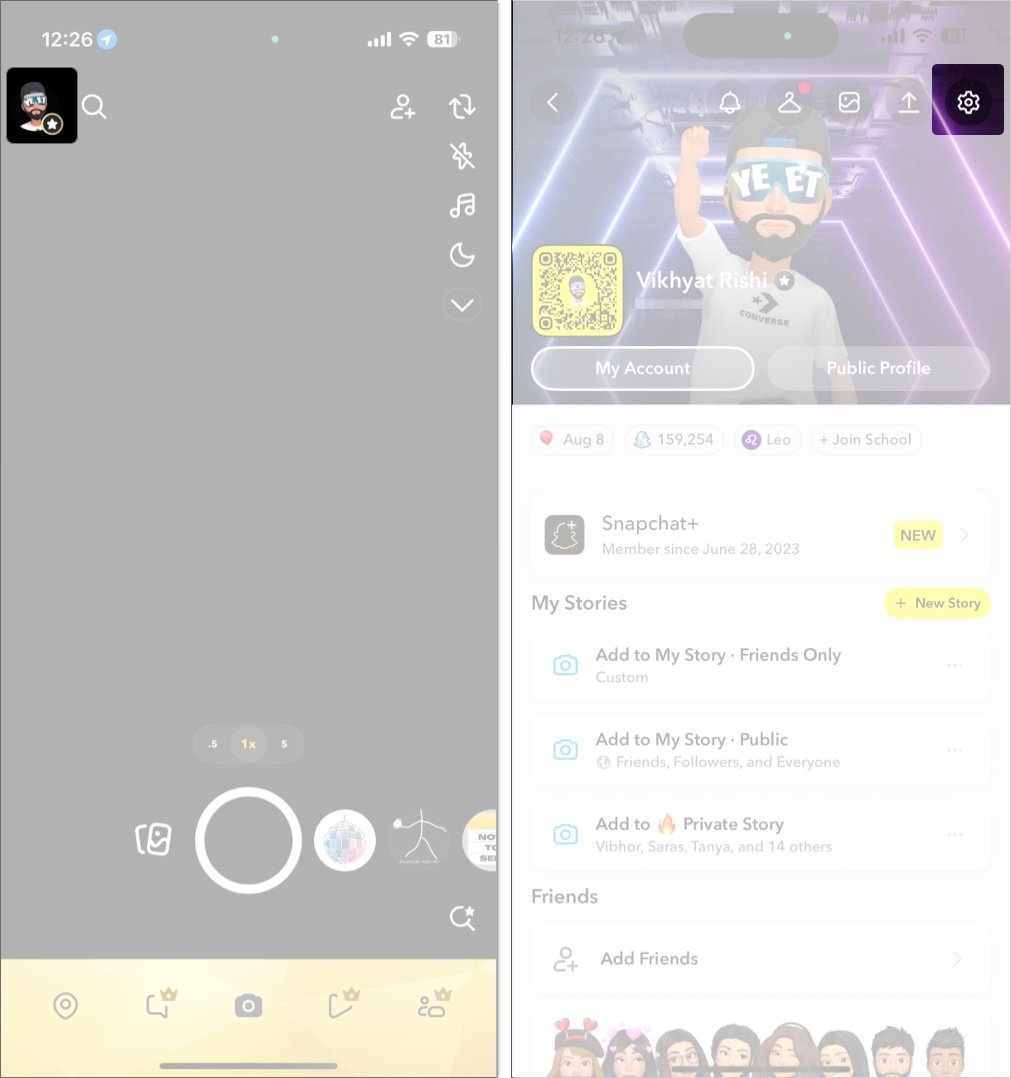
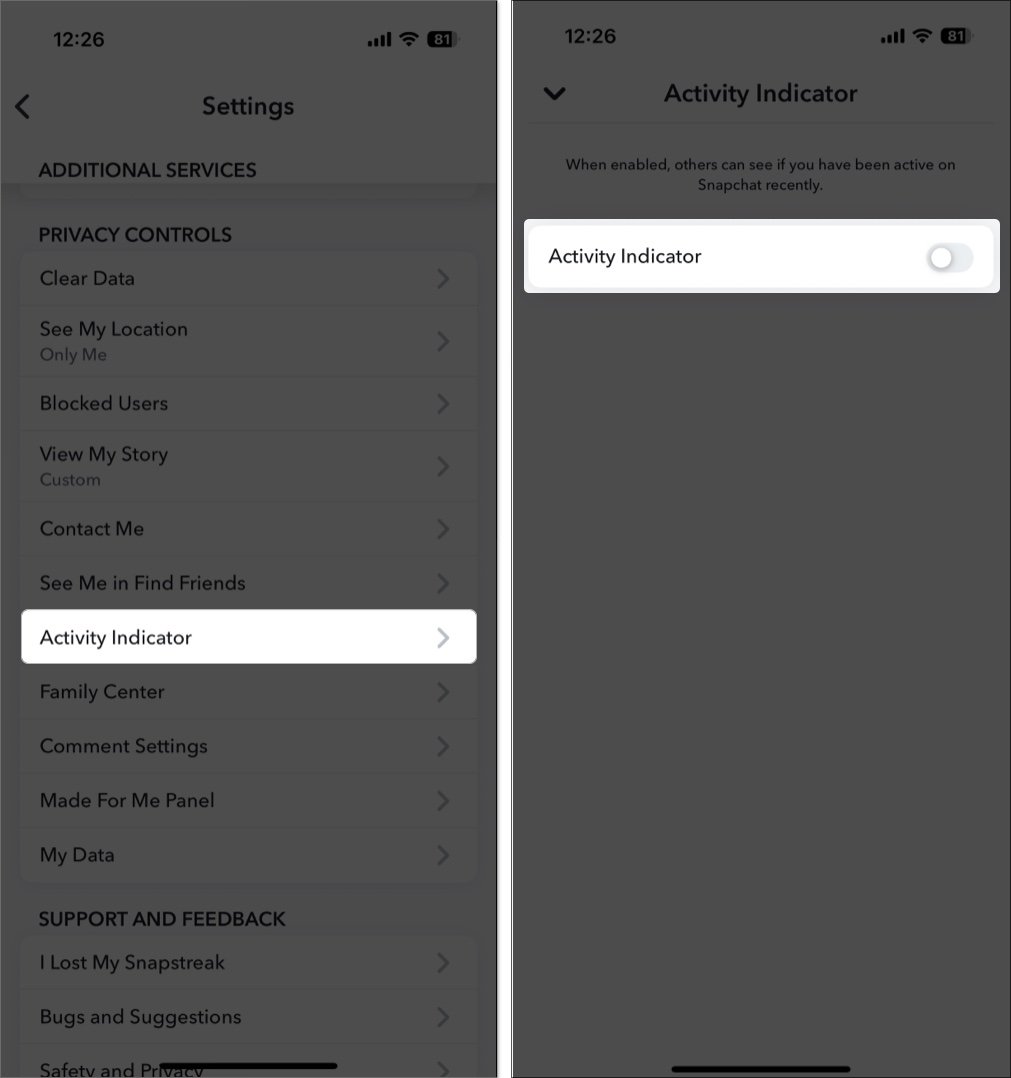
Once it’s off, other people won’t see a green dot next to your name in Add Friends or Quick Add. But keep in mind, you’ll still be able to see the green dot for people who haven’t turned theirs off.
If you’re expecting to see the green dot but it’s missing, there could be a few reasons:
Lots of social apps use green dots or similar icons to show who’s online, but they don’t all work the same way:
Snapchat’s green dot works a bit differently. It doesn’t show real-time status in chats like some other indicators. Instead, it appears only in certain parts of the app, such as Add Friends and Quick Add, and is meant to indicate that someone was recently active, not that they are online at that exact moment. So if you’re trying to see precisely when your friends are online, Snapchat’s green dot does not provide as much detail as apps like Instagram or WhatsApp.
The green dot on Snapchat shows when someone has recently been active or when their camera is on. It can help you see which friends are around, but you also control whether others can see it for you. If privacy matters, you can easily turn off the Activity Indicator in your settings. This way, you decide who can know when you’re active and who cannot.
FAQs
No, it usually means they were active recently (in the last 24 hours), but not that they are online right now.
No, if you turn off the Activity Indicator, it turns off for everyone, not just certain friends.
No, Ghost Mode only hides your location on Snap Map. To hide the green dot, you need to turn off the Activity Indicator (see above).
That is your phone’s privacy indicator, showing that the camera is being used.
No, Snapchat does not tell you when someone sees your status indicator.
Check out these helpful guides too:











